Bottom Line: A $4.99 app that fully justifies the $499 investment in an iPad every family needs to make.
The name School Writing does not do Australian developer Demografix' app justice. Handwriting instruction is just the tip of the iceberg. If you take the best parts of any of our four-star rated handwriting apps, supersize them, throw in two helpings of favorite free app Educreations and add a big slice of five-star rated See. Touch. Learn., you might come close to understanding how awesome School Writing is.
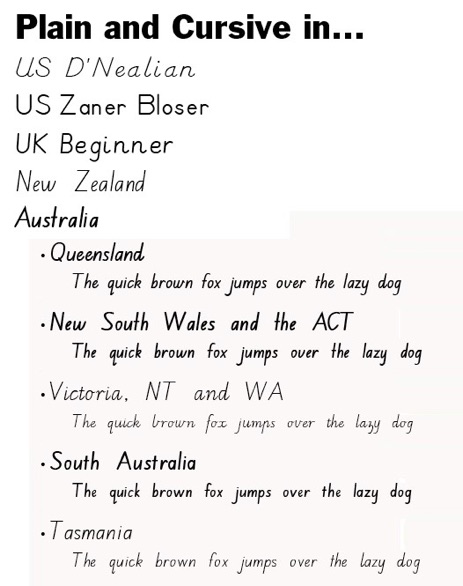
Parents are their children's best teachers but there are some subjects that are best left to professionals. Handwriting instruction is one of them. Paul Collins of Demografix is a former teacher and if School Writing is any indication, he must have been a good one. He has thought of everything to make successful the fairly tedious task of learning to print. School Writing includes 12 different fonts covering those most commonly used in the U.S., U.K., Australia and New Zealand. Australians not only talk funny and spell strangely, apparently they also write differently.
Users have the option of working on uppercase, lowercase, numbers or words. Three different tracing methods are available, which include connecting the dots, overwriting and filling in an outline. Young scribblers get varying pen thicknesses and four ink colors from which to choose. Settings allow sounds, including encouragements, to be individually customized for each user profile. Guidelines, including directional arrows for tracing, can be on or off. All settings can be locked with a four digit PIN. This app is as flexible as a Russian gymnast.
School Writing sets itself apart from the rest of the crowded field of handwriting apps with its unparalleled level of customization. Parents and teachers can record their own tracing demonstrations. This means students can get verbal cues like, "down, up, around", to help them remember how to correctly form letters. Each letter has a default picture and sentence associated with it (like "A is for apple") and both the picture and sentence can be personalized for each user. So my son Dean's profile could have a picture of him and recording of me saying "D" is for Dean, while my other boy Kyle would have his photo with the letter "K." I find this very motivating, although perhaps a bit time consuming for a teacher to set for an entire class.
The recording feature works both ways, so students can see their teachers write, and teachers can get an email in which their students' efforts are replayed. Bad habits such as making letters backwards or going counterclockwise for O's and Q's can be nipped in the bud before they become too ingrained to change. This feature also serves as a nice digital record of progress. OTs and special education teachers should rejoice at not having to waste time at the copy machine.
School Writing gives kids ample opportunity to both practice their newfound writing skills and generalize, with the excellent and comprehensive Words section. It comes with 35 pre-made lessons that run the gamut from writing your name to writing all the Dolch words. These lessons can of course be edited and custom lessons added. The menu keeps track of which lessons have been completed. There is a connection between writing words and learning to spell them, which is why teachers make you write weekly spelling words three times, so these are useful lessons.
In addition to practicing writing the Greco-Roman alphabet, kids and adults can learn to make Chinese or Japanese characters or any other less familiar alphabet, symbol or shape. The app includes 13 lesson examples in the Whiteboard section, but these are really just teasers to show off the myriad possibilities. Additional lessons can be created and shared. The app supports import of lessons using Dropbox, iTunes sync, the developer's website or email. This app is still very new and some teachers are still enjoying their summer so I hope the library of shared creations grows once school starts.
Help with discovering all the app's options and features is available in a manual on the Demografix website. There are also a number of developer-narrated YouTube videos for those that do better with visuals. Most of the menus and editing are straightforward, if lengthy directions are not your thing.
If you're looking for a way to butter up a new teacher when school starts, gift her this app. It exceeded my expectations, which few apps have. Do keep in mind that while its name doesn't tell the full story of its capabilities, the school part is apt. Tracing here is all pen and paper and not fun things like shaving cream, train tracks or jelly beans. School Writing is extremely well-crafted but only useful if the child or student participates.
Highly recommended.